The experienced detectorists at Minelab have put together a comprehensive list of FAQs on how to use a metal detector. These also contain many pro tips for metal detecting.
You may find the answers to your questions by reading the FAQs here and from the related Knowledge Base Articles. Of course, if, after searching through this information you still have a question, there please contact our customer service team.
Ya, pengesan logam Minelab mempunyai keupayaan untuk ' membezakan ' antara pelbagai jenis sasaran . Ciri diskriminasi pada pengesan Minelab mengukur dua sifat sasaran, iaitu sifat ferus dan sifat konduktif .
Sifat ferus merujuk kepada berapa banyak besi dalam sasaran dan oleh itu betapa kuatnya ia tertarik kepada magnet. Sasaran ferus cenderung menjadi sampah, jadi boleh dibezakan/disembunyikan berdasarkan sifat ferusnya sahaja oleh pengesan. Sifat konduktif merujuk kepada seberapa baik sasaran mengalirkan arus elektrik dan oleh itu bertindak balas terhadap medan magnet pengesan logam. Paku dan kerajang seperti sampah mempunyai sifat konduktif yang berbeza terhadap sasaran berharga seperti syiling dan cincin. Dalam kes ini, pengesan logam boleh membuat penilaian sama ada sasaran itu sampah berdasarkan kekonduksian.
Proses untuk mengkonfigurasi tetapan diskriminasi dan kaedah yang digunakan untuk menunjukkan harta karun atau sampah berbeza-beza merentasi rangkaian pengesan Minelab.
Sebagai peraturan umum, semakin rendah frekuensi yang digunakan oleh pengesan, semakin dalam ia boleh menembusi tanah. Walau bagaimanapun, pada frekuensi rendah, kepekaan terhadap sasaran kecil berkonduktor rendah berkurangan. Semakin tinggi frekuensi, semakin tinggi kepekaan terhadap sasaran kecil, tetapi tidak akan menembusi sedalam itu. Secara amnya, pengesan emas beroperasi pada frekuensi yang lebih tinggi (untuk mencari ketulan kecil), manakala pengesan syiling dan harta karun berfungsi pada frekuensi yang lebih rendah untuk penembusan yang lebih dalam. Pengecualian untuk ini ialah pengesan logam jenis MPS yang sensitif dan mencari dalam secara serentak.
Saiz
Saiz gegelung carian boleh mempengaruhi kedalaman pengesanan atau kepekaan pengesan logam. Lebih besar gegelung, lebih dalam ia mengesan, tetapi akan mempunyai kepekaan yang kurang terhadap sasaran kecil. Sebaliknya, lebih kecil diameter gegelung carian, lebih sensitif ia tetapi kehilangan kedalaman pengesanan.
Gegelung yang lebih kecil lebih ringan, lebih mudah dikawal dan boleh dipilih kerana keupayaannya untuk melalui rupa bumi yang sukar atau semak samun. Ia juga merupakan kelebihan di kawasan yang mempunyai banyak sampah.
Bentuk
Bentuk gegelung yang paling biasa ialah gegelung bulat pepejal konvensional, gegelung berbentuk elips dan gegelung jaring terbuka. Sebab utama perubahan bentuk adalah untuk mematuhi keperluan fizikal, iaitu gegelung elips boleh ditolak di sekitar semak atau di antara batu lebih mudah daripada gegelung bulat dan gegelung jaring terbuka bergerak melalui air lebih mudah dan lebih ringan. Gegelung bulat konvensional selalunya lebih stabil dan berfungsi dengan lebih baik dan amat popular untuk mencari emas.
Konfigurasi
Tiga jenis belitan gegelung yang paling biasa ialah Sepusat, Double-D dan Monoloop. Perbezaan antara jenis gegelung ini ialah corak dawai yang dililit di dalam gegelung carian.
Gegelung sepusat
Gegelung sepusat mempunyai lilitan dawai bulatan dalam dan bulatan luar. Corak cariannya berbentuk kon dan boleh berguna untuk menentukan sasaran dengan tepat. Gegelung sepusat cenderung lebih bising di tanah yang sangat bermineral dan memerlukan lebih banyak pusingan sapuan untuk liputan tanah yang menyeluruh.
Gegelung D berganda
Gegelung Double-D adalah gegelung pilihan untuk kebanyakan pengesanan. Ia memberikan isyarat berbentuk bilah atau pahat yang menutupi tanah dengan lebih seragam dan sebaik sahaja pengendali terbiasa dengan isyarat tersebut, penentuan tepat boleh menjadi sangat tepat. Gegelung Double-D juga diutamakan kerana keupayaan pengimbangan tanahnya yang unggul.
Gegelung monoloop
Gegelung monoloop mempunyai satu lilitan dawai di sekeliling lilitan gegelung, yang digunakan untuk menghantar dan menerima. Corak isyarat gegelung Monoloop berbentuk kon, memerlukan lebih banyak pertindihan. Dalam tanah yang sangat banyak mineralnya, ia boleh menjadi lebih sukar untuk diimbangi tanahnya, namun ia cenderung memberikan kedalaman yang sedikit lebih baik daripada gegelung Double-D.
Kotoran, habuk dan kelembapan boleh terperangkap di dalam skidplate yang membawa kepada isyarat palsu dan prestasi yang lemah. Untuk mengekalkan prestasi puncak pengesan Minelab anda, adalah disyorkan untuk membersihkan skidplate dengan kerap.
Periksa panduan pemilihan gegelung untuk mencari gegelung yang paling sesuai untuk keperluan mengesan anda.
Spesifikasi fon kepala tidak begitu penting dalam pengesan logam kerana litar audionya tidak menghasilkan bunyi berkualiti Hi-Fi. contohnya, julat output frekuensi pengesan kami hanya sekitar 75 -1200Hz.
Litar audio kami akan memacu kebanyakan fon kepala dari 16 - 100 + ohm.
Pengoptimuman audio juga sangat subjektif kerana setiap orang mendengar secara berbeza.
Kami berusaha untuk tidak mengelirukan pelanggan kami dengan spesifikasi teknikal yang tidak perlu kerana pada hakikatnya tiada cara yang jujur untuk menentukan fon kepala yang terbaik untuk anda selain daripada mencubanya.
Jika anda mempunyai pengesan dengan nada audio boleh laras, seperti CTX 3030, kami juga mengesyorkan anda meluangkan sedikit masa untuk memastikan nada pengesanan dioptimumkan untuk keperluan pendengaran anda.
Tiada jawapan khusus untuk soalan ini kerana ia bergantung kepada saiz sasaran, orientasi, kandungan logam, mineral dan kekonduksian tanah, bunyi elektrik dan ambien di kawasan tersebut dan sebagainya.
Walau bagaimanapun, kita biasa mendengar pengesan Siri GPX menemui ketulan emas besar pada kedalaman 3 dan kadangkala 4 kaki, dan CTX 3030 menemui syiling dan cincin pada kedalaman lebih 12 inci.
Hanya jika ia menjadi rosak.
Pada sesetengah pengesan, anda tidak perlu mengimbangkan bumi langsung. Pada pengesan lain, pengguna yang baru dalam pengesanan disyorkan untuk menggunakan fungsi Penjejakan Imbangan Bumi.
Dalam Penjejakan, pengesan akan mengimbangkan bumi secara automatik untuk anda dan kekal seimbang walaupun mineral bumi berbeza-beza. Pada pengesan imbangan bumi manual seperti X-TERRA 305 dan X-TERRA 505, anda perlu mengimbangkan bumi pada permulaan setiap pemburuan, dan mengimbangkan semula secara berkala mengikut keperluan. Sentiasa mengimbangkan bumi di atas tanah yang bersih, jauh dari objek logam.
Rantai emas sangat sukar dikesan, terutamanya rantai yang sangat halus. Setiap pautan rantai boleh jadi sangat kecil dan pengesan melihat setiap pautan sebagai sasaran yang berasingan, jadi ia mudah terlepas pandang. Anda lebih cenderung untuk mengesan gesper sebenar atau sebarang loket yang mungkin masih ada pada rantai kerana ini jauh lebih besar daripada pautan rantai individu. Pengesan frekuensi tinggi seperti Eureka Gold, atau X-TERRA 705 dengan gegelung 18.75 kHz dalam mod prospek, selalunya akan mengesan rantai halus dengan lebih baik daripada kebanyakan pengesan syiling.
Coke ialah karbon dan oleh itu boleh menjadi agak konduktif, sama seperti syiling.
GPZ 7000 ialah pengesan terdalam kami dalam semua keadaan tanah dan boleh mengesan walaupun melalui batuan yang sangat bermineral.
Tidak, ciri-ciri kabel dipadankan dengan belitan gegelung semasa pembuatan, jadi memanjangkan kabel akan mengurangkan prestasi gegelung.
Gegelung yang lebih kecil adalah lebih baik untuk tapak yang tidak berkualiti, kerana ia mengurangkan kejadian mengesan berbilang sasaran sekaligus. Gegelung sepusat pada amnya lebih baik daripada gegelung Double-D atas sebab yang sama.
Semak panduan pemilihan gegelung untuk mencari gegelung yang paling sesuai untuk keperluan pengesanan anda.
Pengesan logam mengesan isyarat elektromagnet daripada objek logam bawah tanah. Isyarat serupa juga boleh diterima melalui udara daripada sumber elektromagnet lain, seperti talian kuasa, pemancar radio, penjana, dan sebagainya.
Jika pengesan anda bising semasa anda mengesan, tetapi menjadi senyap apabila anda berhenti menyapu gegelung, maka ia sedang menerima isyarat daripada tanah bermineral. Lakukan imbangan tanah dan teruskan pengesanan.
Siri GPX sahaja: jika ia masih bising, anda mungkin perlu mencuba pilihan tanah/pemasaan alternatif. Semua pengesan lain: jika ia masih bising, anda perlu mengurangkan kepekaan anda ke tahap kepekaan stabil tertinggi.
Satu-satunya cara yang terjamin untuk mendapatkan setiap sasaran yang baik adalah dengan tidak menggunakan diskriminasi. Walau bagaimanapun, menggali setiap sasaran boleh membuang banyak masa. Corak diskriminasi sentiasa merupakan kompromi antara menggali kebanyakan sasaran yang baik dan mengabaikan kebanyakan sasaran sampah.
Ini boleh disebabkan oleh beberapa sebab:
Biasanya kerana anda mengangkat gegelung di hujung ayunan anda. Sentiasa sapu perlahan, rendah dan rata untuk keseluruhan ayunan.
Teknologi Penghantaran Voltan Sifar (ZVT) menghasilkan medan magnet berkutub bertentangan berkuasa tinggi ultra malar.
ZVT menyediakan pengguna dengan keseimbangan tanah yang unggul untuk meningkatkan kestabilan pengesan dalam tanah bermineral dan akan mengesan ketulan emas pada kedalaman ekstrem yang melebihi semua produk pesaing semasa.
GPZ 7000 merupakan alat pengesan terbaik kami pada ketulan sederhana hingga besar, walaupun di kawasan yang sangat bermineral atau berubah-ubah. Ia mengekalkan keupayaan kedalaman yang unggul berbanding mana-mana pengesan lain sambil tetap memberikan kepekaan yang baik kepada sasaran yang lebih kecil dan cetek.
Pengesan GPZ 7000 mempunyai gegelung berjenama Minelab dan selepas jualan yang tersedia untuk dibeli. Gegelung berjenama Minelab boleh didapati daripada pengedar yang diperakui oleh Minelab. Anda boleh membeli gegelung Super-D 14” atau 19”.
Gegelung NuggetFinder telah mengeluarkan 2 gegelung selepas jualan yang diluluskan oleh Minelab. Gegelung Super-D bulat 12” dan gegelung Super-D elips 17” yang boleh dibeli oleh penjual NuggetFinder .
Tidak, GPZ 7000 tidak mempunyai sebarang keupayaan diskriminasi.
Tetapan Jenis Tanah Sukar ialah tetapan lalai dan disyorkan kerana emas biasanya ditemui di kawasan yang mempunyai tanah yang sangat bermineral.
Tetapan Jenis Tanah Normal akan memberikan kedalaman pengesanan yang paling besar tetapi hanya boleh digunakan dalam tanah yang "tenang" di mana terdapat tahap mineralisasi yang lebih rendah di dalam tanah.
Jika pengesan berjalan tidak stabil atau bising semasa menggunakan jenis pembumian "Biasa", anda harus bertukar kepada "Sukar".
Jenis Tanah Teruk akan memberikan kedalaman pengesanan terendah dan hanya boleh digunakan apabila mengesan di kawasan yang mempunyai tahap mineralisasi yang sangat tinggi. Tetapan ini hanya boleh digunakan di kawasan di mana anda perlu menaikkan gegelung di atas tanah apabila menggunakan tetapan Jenis Tanah “Sukar”.
Apabila mengimbangkan bumi, cincin ferit kuning secara buatan menambah data tambahan untuk membantu GPZ 7000 meningkatkan ketepatan imbangan bumi. Ini harus sentiasa digunakan untuk memastikan operasi yang lancar. Sapukan gegelung ke atas cincin ferit kuning dalam gerakan pengimbangan bumi angka 8, pastikan anda menyapu ke atas cincin ferit kuning dengan setiap pergerakan angka 8.
Apabila diseimbangkan dengan betul, anda sepatutnya mendengar nada audio yang lancar apabila menyapu gegelung ke atas cincin ferit kuning.
Apabila mengimbangkan tanah GPZ 7000, pergerakan berayun atau angka-8 disyorkan kerana GPZ 7000 sentiasa memantau perubahan dalam tanah. Menyapu gegelung ke atas sebanyak mungkin tanah memastikan anda menyapu cincin ferit kuning dengan setiap pergerakan ayunan/angka-8 apabila pengimbangan tanah membolehkan pengesan memperoleh seberapa banyak maklumat yang mungkin tentang keadaan tanah setempat yang memberikan keseimbangan tanah yang unggul.
Audio tanpa wayar mudah terputus sambungan audio apabila isyarat disekat. Putus sambungan audio boleh dikurangkan dengan memastikan garis penglihatan terus antara WM12 dan pengesan. Adalah lebih baik untuk memakai WM12 sedekat mungkin dengan pengesan. Ini meminimumkan laluan ke pemancar tanpa wayar dan mengurangkan kemungkinan badan pengendali akan menyekat laluan isyarat antara WM12 dan pengesan.
GPZ 7000 akan beroperasi selama kira-kira 8 jam apabila dihidupkan dengan bateri yang dicas sepenuhnya. Pengecasan bateri biasanya mengambil masa 5 – 6 jam.
Modul tanpa wayar WM12 akan beroperasi selama kira-kira 12 jam dengan bateri yang dicas sepenuhnya dan mengambil masa kira-kira 12 jam untuk dicas apabila dicas melalui pengecas BC10.
Ya, GPZ 7000 boleh dicas daripada sistem bateri nominal 24V. Pengecas BC10 boleh berfungsi antara 11 – 30 volt DC.
Anda juga boleh menggunakan pek palam AC 240V yang dibekalkan jika kenderaan anda dilengkapi dengan penyongsang.
Tidak, Minelab pada masa ini tidak mempunyai rancangan untuk mengeluarkan pek bateri sel atau alkali yang boleh diganti.
Terdapat 2 kabel USB yang dibekalkan di dalam kotak GPZ 7000 anda. Kabel USB-A ke Mini-USB digunakan untuk mengecas modul wayarles WM12.
USB-A ke USB-B digunakan untuk kemas kini perisian dan dipasang pada bahagian belakang pod skrin dan PC.
Di bahagian belakang pod skrin terdapat port USB-B yang boleh digunakan jika naik taraf perisian dikeluarkan. Semak bahagian muat turun halaman GPZ 7000 di laman web kami untuk kemas kini.
Teknologi GeoSense-PI ™ menganalisis dan bertindak balas terhadap isyarat tanah dengan kejelasan dan ketepatan yang besar, sehingga anda dapat mengesan di persekitaran yang sukar setelah difikirkan tidak dapat dikesan. Ia dengan cepat menekan isyarat yang tidak diingini melalui tiga sistem maklum balas yang bertindih untuk pengesanan yang pantas walaupun kepingan emas terkecil.
GPX 6000 adalah pemain terbaik kami dalam nugget kecil yang lebih banyak, walaupun di tanah yang sangat mineral atau berubah-ubah. Ia mengekalkan kedalaman yang sangat baik, tepat di belakang GPZ 7000 pada nugget yang lebih besar dan lebih dalam.
Gegelung GPX 6000 adalah rangkaian gegelung berprestasi tinggi baru yang tidak sesuai dengan pengesan siri GPX terdahulu.
Gegelung Double-D 14 "di GPX 6000 hanya dapat digunakan untuk pembatalan EMI atau pembatalan isyarat tanah konduktif. Ia tidak dapat melakukan diskriminasi besi.
Gegelung Minelab berikut kini tersedia untuk beroperasi dengan GPX 6000:
Gegelung selepas pasaran yang diluluskan oleh Minelab boleh didapati daripada Coiltek dan NuggetFinder.
Penggulungan pertama kabel gegelung dari gegelung harus selalu melewati batang. Kabel gegelung kemudiannya harus dililit dengan erat di sekitar batang dan dipegang dengan dua tali velcro. Anda harus membiarkan ruang yang cukup untuk gegelung dapat bergerak dengan bebas semasa mengesan.
GPX 6000 tidak mengesan komponen Ferrite dari tanah. GeoSense-PI menggunakan teknik lain untuk menghilangkan tindak balas 'X' yang tidak dapat dilihat oleh pengendali.
Anda tidak memerlukan ferit kuning untuk mengimbangkan GPX 6000.
Nada ambang boleh dihidupkan dan dimatikan dalam tetapan sensitiviti dengan menekan butang Jenis Tanah dengan lama.
Perhatikan bahawa nada Ambang dihidupkan dalam julat kepekaan Manual dan dimatikan dalam julat kepekaan Automatik. Apabila GPX 6000 dihidupkan seterusnya, nada Ambang akan kembali ke lalai.
Pengaturan Jenis Tanah Sulit paling baik digunakan di tanah yang lebih banyak mineral, terutama dengan batu panas atau tanah yang sangat berubah-ubah.
Tetapan Jenis Tanah Biasa mempunyai kedalaman terbesar pada nugget yang lebih besar; ia digunakan sebaik mungkin dan sentiasa di tanah dengan tahap mineralisasi yang lebih rendah atau tanah yang tidak berubah. Jenis tanah biasa boleh mengambil batu panas sebagai sasaran. Sekiranya batu panas tidak dapat diimbangi dengan tanah, anda perlu menggunakan tetapan Jenis tanah yang sukar.
GPX 6000 dengan GeoSense-PI sentiasa menjejaki tanah, jadi kedua-dua teknik ini akan berkesan. Minelab mengesyorkan pengepaman GPX 6000 ke atas dan ke bawah di atas tanah dengan butang Quick-Trak ditekan untuk mencapai Imbangan Tanah terpantas.
Tanah konduktif tidak harus dikaitkan dengan garam yang kelihatan. Sebagai contoh, hujan baru-baru ini boleh menjadikan tanah lebih konduktif dan meningkatkan tindak balas tanah konduktif yang tidak diingini.
Audio tanpa wayar terdedah kepada putus suara ketika isyarat disekat. Penutupan audio dapat dikurangkan dengan memastikan penglihatan langsung antara fon kepala dan pengesan. Lebih baik memakai fon kepala dengan kawalan Bluetooth yang paling dekat dengan pengesan. Ini meminimumkan jalan ke pemancar Bluetooth dan menjadikan badan pengendali akan menghalang laluan isyarat antara fon kepala dan pengesan.
GPX 6000 akan beroperasi selama kira-kira 8 jam apabila bermula dengan bateri yang diisi penuh. Mengecas bateri biasanya akan memakan masa 5 - 6 jam.
Fon kepala ML 100 akan beroperasi selama kira-kira 24 jam pada bateri yang diisi penuh dan memerlukan masa sekitar 3.5 jam untuk dicas.
Bateri GPX 6000 hanya boleh dicas dari sistem bateri kereta 12V nominal semasa mengecas dari kenderaan.
Minelab pada masa ini tidak mempunyai rancangan untuk melepaskan pek bateri sel atau alkali yang boleh diganti.
Kabel USB digunakan untuk mengisi fon kepala Bluetooth dan akan digunakan jika peningkatan perisian tersedia untuk GPX 6000.
Di belakang grill pembesar suara terdapat port USB yang dapat digunakan jika peningkatan perisian dilepaskan. Periksa bahagian muat turun halaman GPX 6000 di laman web kami untuk maklumat terkini.
Anda tidak pernah dapat meramalkan tahap mineralisasi tanah apa yang akan ada di lokasi tertentu, sebab itulah Normal adalah Masa yang disyorkan untuk bermula. Kemudian, anda boleh membiarkan pengesan memberitahu anda Masa yang akan digunakan dengan menyapu gegelung dan mendengar kestabilan ambang.
Setelah melakukan Auto Tune dan Ground Balance, anda harus memulakan pencarian, dan jika pengesan terlalu bising atau memberi isyarat pada banyak batu panas, maka Waktu yang anda gunakan terlalu agresif untuk tanah yang anda jalani. Anda perlu memilih ke Waktu yang lain lebih dekat dengan hujung gelap skala di bawah ini, misalnya Meningkatkan.
GPX 5000 diketahui menderita Gangguan Elektromagnetik (EMI) terutamanya semasa cuaca ribut. Terdapat tiga sebab yang diketahui untuk gangguan ini:
Pada hari EMI yang buruk, berikut adalah beberapa petua yang dapat mengekalkan ambang batas anda:
Pastikan anda tidak menggunakan gegelung Monoloop dengan suis Coil Rx diatur ke Batal.
Gegelung Monoloop mempunyai kabel bulat yang sempurna.
Gegelung Double-D mempunyai kabel lebih rata kerana dua teras dalaman.
Letakkan suis Coil / Rx di Batal. Sekiranya anda mempunyai kedalaman yang sedikit berkurang daripada yang anda jangkakan, maka gegelung anda adalah Double-D. Sekiranya anda hampir tidak mempunyai kedalaman, maka anda mempunyai gegelung Monoloop.
Fungsi Stabilizer mengawal titik di mana variasi samar di Ambang mula didengar. Variasi samar ini boleh menjadi bunyi persekitaran atau isyarat sasaran samar. Semasa anda meningkatkan kawalan Stabilizer, isyarat sasaran samar akan menjadi lebih kuat, tetapi tahap kebisingan juga akan meningkat, yang berpotensi menyembunyikan isyarat sasaran yang diinginkan. Stabilizer membolehkan anda menutupi variasi samar ini untuk memberikan tahap stabil yang sempurna, meningkatkan kemampuan anda untuk mengenal pasti isyarat sasaran samar.
Stabilizer paling baik ditinggalkan dalam kedudukan FP (preset kilang) sehingga keadaan tanah di lokasi ditentukan. Setelah tahap Rx Gain telah ditetapkan untuk keadaan tempatan dan tetapan audio lain telah dipilih, Stabilizer kemudian dapat digunakan untuk menyesuaikan kestabilan Ambang.
Untuk mencari kedudukan Stabilizer yang optimum, pastikan gegelung disapu ke tanah. Satu nombor di bawah titik di mana ambang mula berceloteh, biasanya merupakan keadaan terbaik.
Kesan Stabilizer dapat dilihat mempunyai kesan yang serupa dengan kawalan Rx Gain. Walau bagaimanapun, Stabilizer hanya mempengaruhi pemprosesan audio dan tidak mengubah isyarat Terima (Rx), jadi harus digunakan sebagai pentas akhir. Setelah membuat penyesuaian pada Stabilizer, jika keadaan tanah berubah atau anda ingin mengubah gegelung, anda mungkin perlu mengatur ulang Rx Gain, tetapi sebelum melakukannya, kembalikan Stabilizer ke pengaturan Factory Preset terlebih dahulu. Ini akan memastikan anda memilih tahap Rx Gain yang paling sesuai untuk memenuhi syarat, dan kemudian anda dapat menyesuaikan dengan menggunakan Stabilizer.
Petua: Dengan memutar kawalan Stabilizer ke minimum (lawan arah jam) ambang akan sangat stabil, tetapi anda akan kehilangan banyak kepekaan terhadap sasaran yang lebih kecil. Ini boleh menjadi ciri yang diinginkan dalam senario tertentu seperti mencari nugget besar di kawasan sampah tinggi, atau menggunakan GPX 5000 dan GPX 4800 untuk mencari duit syiling atau harta karun.
Petua: Kami mengesyorkan pesanan terbaik untuk menetapkan kawalan ini adalah:
Volume Sasaran mengawal kekuatan isyarat sasaran, dan pada tetapan di atas 8 ia akan sedikit meningkatkan jumlah ambang juga. Ini berguna untuk keadaan yang sangat berangin, bagi orang yang mengalami pendengaran, atau ketika menggunakan pembesar suara luaran. Dengan penguat audio yang terdapat di dalam pek bateri Li-Ion, anda boleh memasang pembesar suara terus ke bateri, dan menetapkan tahap penguat yang sesuai menggunakan Volume Volume. Ketahuilah bahawa semasa menukar dari fon kepala ke pembesar suara luaran, anda mungkin perlu melakukan sedikit penyesuaian pada kawalan Ambang dan Had Volume.
Volume Sasaran dapat digunakan sebagai dorongan Audio dalam kondisi tenang, dan juga dapat digunakan untuk mengurangi atau meredam isyarat kebisingan tanah di tanah yang sangat mineral. Ini adalah ciri yang hebat, dan akan berfungsi bersama dengan kawalan Stabilizer, memberikan anda kemampuan penalaan terbaik. Sedikit percubaan mungkin diperlukan untuk mencari kombinasi yang optimum dalam keadaan yang berbeza.
CATATAN: Setiap kali penyesuaian terhadap Keuntungan diperlukan, kerana perubahan gegelung atau lokasi, pastikan Volume Sasaran dikembalikan ke tetapan FP terlebih dahulu. Anda kemudian boleh menyesuaikan dengan keadaan baru.
SDC 2300 ialah pengesan prospek emas kami yang padat dan kalis air. Ia menggunakan teknologi Induksi Nadi (PI) Berbilang Tempoh Pantas (MPF) yang memberikan kepekaan yang sangat baik apabila mengesan ketulan bersaiz kecil hingga sederhana di tanah yang sangat bermineral atau berubah-ubah. SDC 2300 memberikan kedalaman yang baik pada ketulan yang lebih besar dan lebih dalam.
Tidak, tiada gegelung berjenama Minelab lain yang tersedia untuk SDC 2300. Gegelung bulat 8” yang dibekalkan memberikan prestasi keseluruhan yang sangat baik untuk SDC 2300 dan memastikan pengesan kalis air dan padat.
Tidak, tiada fungsi diskriminasi yang tersedia untuk SDC 2300.
Tiada pancaran audio ambang malar melalui pembesar suara atau fon kepala menunjukkan bahawa audio ambang berada dalam tetapan MATI atau minimum.
Kelantangan ambang boleh dilaraskan dengan menekan butang ambang di sebelah kanan pemegang.
Terdapat 9 tahap audio Ambang yang ditunjukkan oleh paparan LED. Dengan setiap tekanan butang ambang, anda akan melihat LED pada paparan bergerak secara berperingkat ke kanan, audio ambang juga akan mula meningkat. Apabila tahap ambang berada pada tahap maksimum, menekan butang Ambang akan mengitar semula tahap ambang kembali ke tetapan MATI atau minimum.

SDC 2300 mempunyai 2 tetapan nada audio, Rendah atau Tinggi. Nada tinggi adalah tetapan lalai, untuk menukar kepada tetapan rendah, matikan pengesan kemudian tekan dan tahan butang Ambang sambil menghidupkan pengesan.
SDC 2300 akan mengingati tetapan sebelumnya jadi anda perlu menekan dan menahan butang Ambang sambil menghidupkan pengesan untuk kembali ke tetapan Pic Tinggi.
SDC 2300 kalis air sehingga 3m (10 kaki). Ini adalah pengesan lengkap termasuk kotak kawalan.
Ya, SDC 2300 mempunyai mod garam dalam pelarasan sensitiviti, namun Minelab tidak mengesyorkan penggunaan SDC 2300 di pantai kerana SDC 2300 tidak mempunyai ciri diskriminasi atau ID sasaran jadi anda akan menggali banyak sampah.
Mod garam dalam SDC 2300 anda direka bentuk untuk digunakan di tanah konduktif seperti tasik garam atau tanah bermineral basah yang terdapat di ladang emas di mana kandungan garam yang tinggi jelas kelihatan. Contohnya, hujan baru-baru ini mungkin menjadikan tanah lebih konduktif dan meningkatkan tindak balas tanah konduktif yang tidak diingini. Jika tanah itu konduktif atau anda mengesannya di tasik garam, laraskan dail sensitiviti kepada tetapan garam.

Untuk memeriksa paras bateri pada SDC 2300 anda, hanya tekan dan tahan butang Batal Bunyi kemudian tekan dan lepaskan butang Ambang. Butang Batal Bunyi kini boleh dilepaskan.
Petunjuk paras bateri akan dipaparkan oleh LED selama lebih kurang 3 saat.
SDC 2300 akan beroperasi selama kira-kira 8 jam apabila dimulakan dengan bateri Li-Ion yang dicas sepenuhnya. Pengecasan bateri biasanya mengambil masa 5 – 6 jam. Apabila menggunakan bateri Alkali C-Cell, anda biasanya akan mempunyai masa penggunaan yang lebih lama (10-14 jam) tetapi ini bergantung pada kualiti bateri C-Cell yang anda gunakan.
Tidak, bateri SDC 2300 hanya perlu dicas daripada sistem bateri kereta nominal 12V apabila dicas daripada kenderaan.
SDC 2300 termasuk pek bateri Li-Ion yang boleh dicas semula di dalam kotak. Kompartmen bateri juga boleh menerima bateri Alkali C-Cell atau bateri boleh dicas semula C-Cell NiMH. Anda boleh melihat kekutuban untuk bateri C-Cell di sisi kotak kawalan.
Tidak, perisian pada SDC 2300 tidak boleh dinaik taraf.
GOLD MONSTER 1000 ialah pengesan prospek emas peringkat permulaan Minelab, yang direka untuk mencari ketulan terkecil di tanah yang sederhana bermineral. Ia mengekalkan kepekaan yang sangat baik terhadap ketulan cetek yang lebih kecil dan boleh mengesan beberapa ketulan yang lebih besar pada kedalaman.
Penunjuk Peluang Emas di bahagian atas skrin menunjukkan sama ada sasaran mempunyai kandungan ferus atau bukan ferus. Jika penunjuk sentiasa menghala ke kanan, ia menunjukkan kandungan bukan ferus yang tinggi dan kemungkinan besar logam bukan ferus seperti: emas, perak, loyang, kuprum, aluminium, plumbum, zink atau aloi lain yang tidak mempunyai sebarang kandungan besi (ferus).

Jika penunjuk menghala ke kiri, ia menunjukkan kandungan ferus yang tinggi dan kemungkinan besar keluli atau besi.
Sasaran keluli dan besi (ferus) yang besar boleh menunjukkan di sebelah kanan. Ini berlaku apabila sifat konduktif sasaran ferus yang besar menguasai isyarat dan menutup sifat magnet sasaran.
GM05 dan GM10 adalah satu-satunya gegelung serasi yang boleh digunakan dengan GOLD MONSTER 1000. GM05 disertakan di dalam kotak dan gegelung GM10 boleh dibeli sebagai aksesori daripada pengedar Minelab.
Tiada gegelung selepas jualan yang tersedia untuk GOLD MONSTER 1000 pada masa ini.
Lilitan pertama kabel gegelung dari gegelung hendaklah sentiasa melalui aci. Lilitan kabel gegelung di atas aci memberikan tekanan minimum pada kabel gegelung yang akan membantu mengelakkan kerosakan. Kabel gegelung kemudiannya hendaklah dililit rapat di sekeliling aci, memberikan ruang yang cukup untuk gegelung bergerak bebas semasa mengesan.

Tekan kabel gegelung ke dalam klip di bahagian belakang pod skrin dan kemudian skrukan penyambung gegelung dengan berhati-hati ke bahagian belakang pod skrin.


There are 10 manual and 2 auto sensitivity levels.
Auto is located in position 11 on the sensitivity dial and will be indicated with a black dot in the centre of the sensitivity dial.
When in Auto the detector will function smoothly in most soil types and will continually adjust the detector’s sensitivity level to maintain smooth operation.

Auto + is located in position 12 on the sensitivity dial and will be indicated with a black dot in the centre of the sensitivity dial.
Auto + is a more aggressive sensitivity which provides users with additional sensitivity for extra depth performance. Auto+ should only be used in moderately mineralised soils as this setting may provide more ground noise.

Manual sensitivity adjustments (1 – 10) are for the expert user who has a good understanding of soil mineralisation and electro-magnetic interference (EMI).
Manual sensitivity allows the user to adjust the detector’s performance manually, when you have selected a sensitivity setting in the manual range the detector will not adjust levels like it does in the Auto or Auto+ modes. You may need to keep adjusting the manual sensitivity when in variable or heavily mineralised soil types.

The GOLD MONSTER 1000 is very sensitive, when you wave your hand over the coil the detector can detect the salt in your blood.
When you are retrieving a target, you should always use the supplied plastic scoop to ensure you detect the desired target and not your hand.
Because the GOLD MONSTER 1000 is highly sensitive to salt detection it is not recommended for beach use.
Chattering, or inconsistent audio is generally a sign that the detector is picking up interference from ground mineralisation or electro-magnetic interference (EMI). If you are in Auto +, try adjusting the sensitivity to Auto or a lower manual sensitivity. If lowering the sensitivity doesn’t fix the issue, then you should move away from sources of EMI. (power lines, cellular phone towers, power generators, thunder/electrical storms, etc.)
Random detection beeps can be caused by mineralisation in the soil. The GOLD MONSTER 1000 has an auto-tracking ground balance feature that continually monitors the minerals in the soil and adjusts the detectors’ ground balance. Rapid changes or high levels of mineralisation in the soil can cause the detector to false signal, if this happens, pump the coil up and down (0.5 - 10cm / 0.2 - 4”) over the areas that are giving false signals. This will help ground balance the detector to the mineralisation in the soil.
If the mineralisation level is too high, then lower the sensitivity to compensate for the mineralisation level.
Lifting your coil into the air will amplify any noise that is in the area. Minelab does not suggest doing this as this is not how our products are designed to be used. Lifting the coil slightly into the air is acceptable when performing a Noise Cancel, once the Noise Cancel is complete the coil should always be kept near the surface of the soil to avoid interference.
No, the GOLD MONSTER 1000 does not have any wireless capability. You can plug in any 3.5mm (1/8”) stereo headphones to the rear of the control pod.
The GOLD MONSTER 1000 will operate for approximately 12 hours when commencing with a fully charged Li-Ion battery. Charging the battery will typically take 5 to 6 hours.
No, the GOLD MONSTER 1000 battery should only be charged from a nominal 12V car battery system when charging from a vehicle.
No, the software in the GOLD MONSTER 1000 cannot be upgraded.
Perisian perlindungan virus di beberapa komputer meletakkan e-mel Minelab ke dalam fail / folder spam, sila periksa folder spam anda untuk e-mel ini. Sekiranya anda tidak menerima e-mel, sila hubungi Pusat Khidmat Sah Minelab terdekat anda .
When XChange 2 is first installed the 'file' icon will not appear until the software recognizes the CTX 3030 being connected for the first time. This is the only time this will happen. After the initial connection the 'FILE' icon will appear and remain. You will no longer need to connect the CTX 3030 to access it.
The factory setting for GeoTrails is off, so you will need to turn it on. First turn GPS ON, then turn GeoTrails ON. From the map screen, press and hold the Map button to access this option. Use the arrows to select ‘View GeoTrails’ and press the Select button.
Enhanced turns on SBAS or Satellite Based Augmentation System which is a generic term for WAAS used in the USA and EGNOS in Europe. These systems use a geostationary satellite to probe the atmosphere and TX this to your GPS receiver. It works well in the USA, but in Europe it seems to be better for planes rather than on the ground. In Australia you get signals from a satellite over Japan which makes your fix worse. Not sure how much of Europe has this as an issue.
The default for the 'User' button is to control the backlight, so if a user changes this to something else, then the backlight is controlled in the Menu/Options/Backlight - ON / OFF / TIME
You’re all done and your time zone has been set.
If you don’t know your UTC Time Zone please refer to the following link: http://www.timeanddate.com/time/map/
In a session, if the WM 10 Wireless Module is enabled and the detector is connected to it then you will hear tones as expected. If you turn off the WM 10 it will 'mute' the detector. Power cycle the detector and you will be able to hear the tones.
The CTX 3030 has a similar ground compensation feature to that on the Explorer SE Pro and E-TRAC models which works very well in most ground conditions, so there is no need to ground balance the CTX 3030 in most conditions. Ground balance should only be performed in 'Extremely Mineralised Ground'. Do not perform ground balance on the beach, this will 'confuse' the detector.
This is a standard feature, when you perform 'Tone ID profile edit', and select Play Tone or Play All, the tones will not sound if the WM 10 Wireless Module is connected.
There are 4 different volume settings. The CTX 3030 remembers what each setting is. If you turn the volume down while using the headphones and then unplug your headphones the external speaker volume will not have changed from your previous setting.
Before placing the twist-lock style armrest on the shaft, turn the lock fully counter clockwise. There is no need to turn the lock completely 90 degrees to lock it. Around 30 to 45 degrees is often sufficient.
This was corrected in a software update. Connect your detector to XChange 2 and check for software updates. We always recommend using the most current software update. If you're on the latest update or the update didn’t correct the problem please contact your regional Minelab Authorised Service Centre.
The modes will change (or be translated) ONLY when changing from ENGLISH to another language and not in reverse. If the detector is initially set up in a language other than English, the modes will appear in that language. But if you change the language to English later, the modes will stay in the original language.
The Trigger will Cancel any adjustment being made and go back one level in the menu.
If you’ve been using the detector a lot since the last time you connected it to XChange 2 then there is a lot of data stored. It could take several minutes for the data to upload. Please be patient.
This could be related to masking, low sensitivity setting, coil overload or etc. Perform a 'Factory Reset' and retest the detector.
To connect the WM 10 Wireless Module to your detector:
If Pairing fails, try selecting another channel
The location of the WM 10 can be an issue for path loss. The human body is very attenuating, so having the WM 10 tucked on your backside away from the detector could cause issues. If you’re having issues place the WM 10 in a clear line of sight to the detector to get best results.
Snapshots are only saved while the detector is on. It is a design feature that the snapshots are deleted when the detector is turned off.
During your initial use of GPS the detector will take a while to build up local data. From a cold start the 'locking in' of where satellites are and etc. takes a few minutes, but it can take an hour to build up lots of local data. This data can be used to get better resolution and shaded sky use.
This is as simple as saving the modes and/or data you want as a file and emailing them the file. Here’s the procedure:
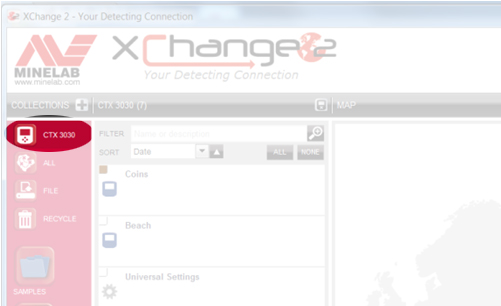
All the modes and other data from your CTX 3030 will be displayed in the list.
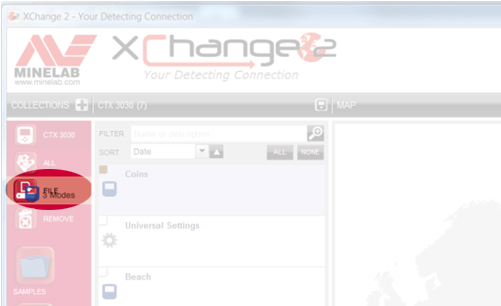
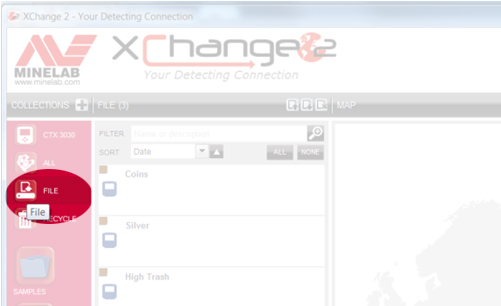
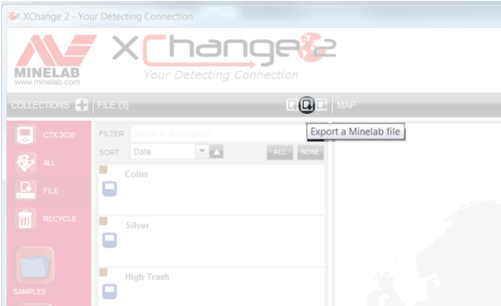
The entire FILE Collection will be exported as a single file, and saved in the Downloads folder of your PC. You can then save the file elsewhere or email it to whoever you want.
If you receive a Minelab FILE from someone else simply open XChange 2, select the FILE Collection and then click the ‘Clear the contents of your File collection’ icon.
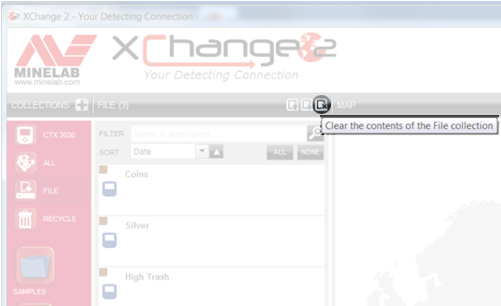
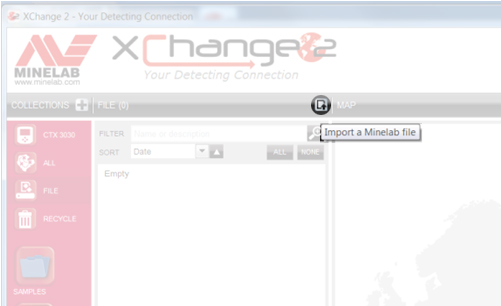
Then click the ‘Import a Minelab file’ icon.
Then click ‘Choose file’,
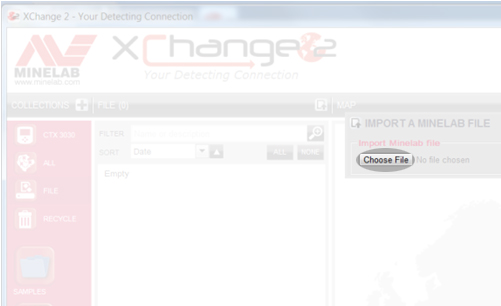
and browse for the file location. Highlight the file and click ‘Open’ and the Items within it will be displayed in the File Collection.
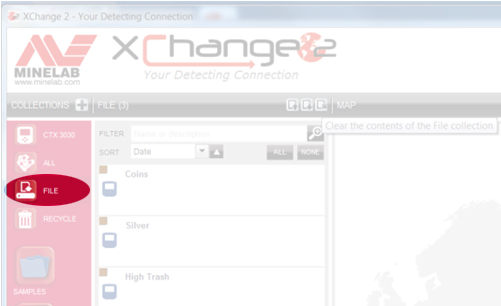
Drag and drop the items you want to keep into one of your own Collections or straight into your CTX 3030.
Combined audio produces different tones for highly ferrous objects, and objects with varying levels of conductivity. First you set the ferrous line (horizontal line) where you want ferrous targets to provide the audio response. For example, if you set it at 21, then any target with a ferrous reading of 21 or higher (larger number) will produce the audio tone that you program for ferrous targets. On the other hand, if the target has a ferrous reading that is less than 21, the audio response will be based on its conductive properties. In Combined audio you have four 'bins' representing conductive groups with conductive numbers running from 01 - 50. You simply move the lines to represent different target groups and assign a tone for each group. For example, you could set bin one with the lines at 01 and 14. Any target with a ferrous value less than 21, and a conductive value of 14 or less would fall into this bin and provide the audio tone you associated with it via programming.
Bin two, for example, could represent targets between 15 and 28. Bin three could represent targets from 29 - 40 and bin four could be the remainder of conductive targets with CO values of 41 - 50. With the numbers used in these examples, if you passed over a target with a FE value of 12 and a CO value of 44, it would provide the conductive tone you assigned to conductive bin four. If you passed over a target with an ID of 11 – 22, it would provide the tone assigned to conductive bin two. Again, the user can resize and assign tones to each target group (bin). For those of you who enjoyed hunting in Two Tone Ferrous with the E-TRAC, this takes it one step further allowing you to adjust the FE line, and break down the CO targets into four separate groups.
Gold can ID anywhere in the range of 10-09 to 13-30, and possibly outside of this range. Sometimes the Conductive reading can be very low, like 02, so to improve your chances you really have to dig everything including aluminium foil and pull-tabs.
Regarding settings, the standard Beach mode is quite suitable. One thing you can do is to change the Tone ID profile to Ferrous 35. What this does is it will make low conductive jewellery produce a higher tone than it would in Conductive profile, making it easier to recognize. You can also select Combine, and customize the tones to suit your personal preference.
For saltwater beaches, Manual Sensitivity is recommended, unless your beaches have high levels of magnetic mineralization. If your unit is running nice and stable on Sensitivity 18, try to push it a bit higher. In situations where you are actually detecting in the salt water, turn the Seawater setting on.
The other thing some beach combers often do is to open up the discrimination pattern a little. Mainly dropping the ferrous rejection slightly or simply search in Pattern 2 (simply press and release the Detect button). This is highly recommended on beaches with low levels of junk targets. In this case another thing you can try is changing the Audio Response to LONG. This can improve your ability to hear the very faint target response which jewellery can produce.
Watch the approved Community Instructional Video on Editing FindPoints and WayPoints.
Watch the approved Community Instructional Video on How to link photos from your phone to FindPoints.
Watch the approved Community Instructional Video that includes How to record a GeoHunt.
Watch the approved Community Instructional Video that includes How to record a FindPoint or WayPoint.
Watch the approved Community Instructional Video that includes How to enable the GPS function.
Watch the approved Community Instructional Video that includes Turning on Detect screen options.
Watch the approved Community Instructional Video that includes Turning on the large target ID panel.
Watch the approved Community Instructional Video that includes Turning on the Sensitivity panel.
Watch the approved Community Instructional Video that includes Turning on the detect screen navigation tool.
Watch the approved Community Instructional Video that includes Selecting a Search Mode on the CTX 3030.
Watch the approved Community Instructional Video that includes Editing a Search Mode on the CTX 3030.
Watch the approved Community Instructional Video that includes transferring data from a CTX 3030 to XChange 2.
Watch the approved Community Instructional Video that includes Creating a new Collection on XChange 2.
Watch the approved Community Instructional Video that includes Changing XChange 2 preferences.
Watch the approved Community Instructional Video that includes Adjusting Universal settings.
Watch the approved Community Instructional Video that includes Making a new Search Mode in XChange 2.
No, The FBS 2 coils can only be used on the CTX 3030, while FBS coils can only be used on the E-TRAC, Safari and Explorer Series detectors.
MULTI-IQ+ is the next generation of MULTI-IQ technology and provides more power with lower electromagnetic interference (EMI) in built up areas.
This provides superior performance and depth allowing users to find previously undetectable targets in most locations.
MANTIKORE akan mengatasi prestasi pengesan EQUINOX dalam hampir semua cara kerana teknologi MULTI-IQ+ yang digunakan dalam MANTICORE memberikan lebih kuasa dan pemprosesan yang lebih pantas yang menyamai kedalaman pengesanan yang lebih baik, kelajuan pemulihan yang dipertingkatkan, lebih banyak pelarasan sensitiviti dan skrin diskriminasi 2D termaju yang menyediakan pengguna dengan lebih banyak maklumat pada sasaran sebelum mereka menggali.
Pada masa ini tiada gegelung lain yang serasi dengan MANTIKORE.
Gegelung aksesori boleh dibeli daripada pengedar Minelab tempatan anda. Untuk mencari pengedar terdekat anda, sila gunakan alat pengesan pengedar dalam talian kami.
Fon kepala ML105 disertakan dalam kotak dengan pengesan MANTIKORE anda dan merupakan fon kepala jenis atas telinga di mana pad buih terletak di atas kepala anda, mengelilingi telinga.
Fon kepala ML85 ialah fon kepala jenis pada telinga di mana pad buih terletak di bahagian luar telinga anda.
UMUM SEMUA BUMI: Prestasi menyeluruh yang sangat baik untuk kebanyakan sasaran dan keadaan. Menyediakan pemisahan sasaran yang hebat dan penolakan sampah yang hebat.
PANTAS SEMUA BUMI: Peningkatan kelajuan pemulihan memberikan pemisahan sasaran yang sangat baik & penolakan kok yang baik.
KONDUKTOR TINGGI SEMUA TERRAIN: Sangat baik untuk konduktor tinggi seperti susunan syiling perak atau sasaran tembaga dan menyediakan pemisahan ID sasaran yang baik.
KONDUKTOR RENDAH SEMUA BUMI: Sangat baik untuk objek kecil/nipis seperti syiling yang dipalu atau barang kemas emas halus.
TOLAK SAMPAH SEMUA rupa bumi: Digunakan di kawasan sampah. Penolakan ferus maksimum
UMUM PANTAI: Prestasi menyeluruh yang sangat baik untuk kebanyakan sasaran dan keadaan pantai apabila digunakan di atas pasir kering atau basah. Menyediakan pemisahan sasaran yang hebat dan penolakan sampah yang hebat.
KONDUKTOR RENDAH PANTAI: Sangat baik untuk sasaran kecil atau nipis seperti rantai emas. Sesuai untuk pasir kering dan basah.
BEACH DEEP: Kelajuan pemulihan yang lebih rendah memberikan kedalaman yang sangat baik untuk sasaran kecil atau nipis seperti rantai emas. Sesuai untuk pasir kering dan basah.
LUNCUR PANTAI & AIR LAUT: Sangat baik untuk keadaan air masin yang sukar termasuk pengesanan dalam air atau ombak.
UMUM GOLDFIELD: Sangat baik untuk nuget kecil dalam tanah jinak hingga sederhana mineral. Mod ini memberikan prestasi keseluruhan yang lebih baik pada ketulan emas dan termasuk audio padang berterusan untuk membantu pengguna mendengar respons sasaran yang lemah. Mod ini tidak dicadangkan untuk kawasan sampah.
Apabila kekerapan ditetapkan kepada MULTI-IQ+, sasaran ferus diberikan ID sasaran pada skala yang sama seperti sasaran bukan ferus, ini ditunjukkan pada skala yang sama seperti ID sasaran bukan ferus. Apabila pemproses dalaman mengklasifikasikan sasaran sebagai ferus, pengesan akan mengeluarkan nada audio yang rendah, mengiringi Penunjuk Ferus merah di bawah nombor ID Sasaran dan skrin 2D akan menunjukkan sasaran untuk muncul di bahagian atas atau bawah skrin, jauh dari garis konduktif pusat. 

*Imej untuk tujuan ilustrasi sahaja.*
Sasaran ferus kompleks yang mempunyai gabungan sifat ferus dan konduktif yang serupa dengan beberapa syiling biasanya akan muncul di bahagian bawah skrin 2D.
Sasaran ferus yang lebih besar akan muncul di bahagian atas skrin. 

Mungkin juga terdapat beberapa sasaran ferus besar dengan bentuk silinder seperti bolt besar yang mempunyai sifat konduktif yang tinggi, jenis sasaran ini boleh menunjukkan jejak sasaran dalam kedua-dua kawasan ferus dan bukan ferus.
*Imej untuk tujuan ilustrasi sahaja.*
Diskriminasi membolehkan pengguna menerima atau menolak individu atau kumpulan ID sasaran. Apabila diskriminasi dilaraskan, perubahan dibuat pada kedua-dua ID sasaran ferus dan bukan ferus. Ini ditunjukkan sebagai garis menegak yang mengkelabukan kedua-dua bahagian ferus dan bukan ferus bagi ID sasaran yang dipilih.
Had ferus membolehkan pengguna melaraskan parameter pengesan untuk menentukan perkara yang dikesan sebagai sasaran ferus atau bukan ferus. Ini boleh dilaraskan dalam kedua-dua bahagian atas dan bawah skrin 2D.
*Imej untuk tujuan ilustrasi sahaja.*
Secara umum, Multi adalah lebih tinggi daripada frekuensi tunggal apabila menggunakan pengesan. Walau bagaimanapun, mungkin terdapat situasi khusus di mana frekuensi tertentu mempunyai kelebihan unik.
*Sila ambil perhatian bahawa apabila menggunakan frekuensi tunggal Had Ferus akan dilumpuhkan dan sasaran ferus akan memberikan ID sasaran 1 hingga 19 dan menunjukkan petunjuk ferus merah pada skrin*
Masa jalan biasa, daripada cas penuh ialah kira-kira 10 jam . Pengesan MANTICORE juga boleh dikuasakan terus daripada mana-mana Bank Kuasa USB yang menyokong keupayaan output 0.5A atau 2A (@ 5V). Ini berkesan memberikan masa jalan berterusan hanya dihadkan oleh bank kuasa yang digunakan.
*Anda TIDAK boleh menggunakan pengesan MANTIKORE anda di bawah air apabila ia disambungkan ke bank kuasa USB*
Pengesan MANTICORE menyokong pengecasan daripada peranti yang mematuhi standard USB 2.0. QuickCharge™ ialah standard proprietari yang dibangunkan oleh Qualcomm yang menggunakan voltan yang lebih tinggi dan tidak serasi dengan pengesan MANTIKORE.
Masa pengecasan, daripada rata sepenuhnya kepada 100%, adalah lebih kurang 7 jam apabila dicas dengan pengecas berkapasiti tinggi (>1.7A @ 5V).
Mana-mana port USB standard yang serasi dengan pengecasan bateri USB 1.2 (BC1.2) boleh digunakan untuk mengecas bateri anda, namun masa pengecasan mungkin lebih lama jika menggunakan pilihan kuasa rendah.
Ketahanan untuk semua bateri bergantung pada beberapa faktor yang selalunya boleh dikawal pada tahap tertentu oleh pengguna; seperti suhu, paras cas apabila disimpan, kitaran pengecasan dsb. Punca paling biasa untuk mengurangkan hayat bateri Li-ION ialah mengekalkan bateri yang dicas penuh pada suhu tinggi.
Seperti semua komponen yang digunakan dalam pengesan kami, kami hanya mendapatkan komponen berkualiti tinggi moden sahaja daripada vendor yang bertanggungjawab. Kami tidak menjangkakan pengguna akan mengalami sebarang masalah bateri selama bertahun-tahun penggunaan. Pengalaman kami dengan pengesan CTX 3030 dan GPZ 7000 yang kedua-duanya menggunakan bateri Li-ION ialah sebahagian besar pengguna tidak perlu membeli bateri gantian.
Gunakan hanya Pengecas USB yang bereputasi dan diperakui semasa mengecas bateri MANTIKORE seperti yang diperincikan di bawah:
Bateri Li-ION yang terkandung dalam pemegang boleh diganti dan dilindungi di bawah jaminan untuk tempoh 6 bulan dari tarikh pembelian. Minelab mengesyorkan menggunakan Pusat Servis Dibenarkan untuk mengelakkan kemungkinan merosakkan meterai kalis air dan membatalkan jaminan pengesan.
Ya, apabila mengesan di darat, tanpa sebarang batasan. Walau bagaimanapun, pengesan tidak boleh digunakan di bawah air semasa mengecas atau apabila disambungkan ke bank kuasa.
ya. Jika pengesan sedang digunakan, apabila dikuasakan oleh bank kuasa USB, bateri mungkin mengecas pada kadar yang lebih perlahan jika terdapat kapasiti ganti yang mencukupi dalam bank kuasa.
ya. Ia adalah amalan yang baik untuk mencuci pengesan dengan air bersih bersih selepas mengesan di dalam air atau di pantai. Jangan sekali-kali menggunakan bahan pelelas atau pelarut untuk membersihkan pengesan.
Tidak. Tidak perlu melincirkan atau melincirkan mana-mana bahagian pengesan, termasuk pengedap kalis air. Menggunakan mana-mana gris berasaskan petroleum akan merosakkan pengedap kalis air dan membatalkan jaminan.
Jika mengharungi dalam atau tenggelam sepenuhnya, kami mengesyorkan menggunakan hanya Fon Kepala Kalis Air Minelab . Ini mempunyai penyambung kejuruteraan khas yang membentuk pengedap kalis air apabila digunakan dengan MANTIKORE. Fon kepala ini tersedia sebagai aksesori yang boleh dibeli daripada pengedar Minelab tempatan anda.
Hardwired coils are more reliable for deep diving detectors.
No, 8 x 1.2V is only 9.6V, and these detectors require 12V to function.
Check to ensure the battery is fully charged. A low battery causes the threshold to get very loud and the response becomes erratic.
Salt, sand and grit will accumulate on the Excalibur II. So make sure you thoroughly rinse it with fresh water after use, including the coil cover, shafts and battery pack. Don't forget the vent holes on each headphone diaphragm as these need to be clear if used for diving purposes to allow for ear equalisation.
The Multi-IQ engine in all EQUINOX series is the same, there are however processor enhancements in the EQUINOX 700 and EQUINOX 900 that allow the detector to provide users with better Iron Bias, target separation and discrimination depth.
Park 1 (General/Coins)
Park 1 is optimised for modern coins and larger jewellery with a default discrimination pattern set to reject many common aluminium foil-like targets. Therefore, this is the ideal Profile to start with to learn EQUINOX before experimenting with the other Modes and more specialist settings. Park 1 Multi-IQ processes a lower frequency weighting of the multi-frequency signal, as well as using algorithms that maximise ground balancing for soil to achieve the best signal-to-noise ratio. Hence Park 1 is most suited for general detecting and coin hunting.
Park 2 (Fine jewellery)
Park 2 is ideal for smaller targets in trash-infested (including ferrous trash) locations. It will detect a wider range of targets including low conductor (or higher frequency) targets, e.g. fine jewellery. All non-ferrous targets are accepted by default. Recovery Speed is increased to clearly identify good targets masked by iron trash. Target Tone is set to maximum to provide as much target information as possible via audio. Park 2 Multi-IQ processes a higher frequency weighted multi-frequency signal while ground balancing for soil.
Field 1 (Coins and Artefacts)
Field 1 is for general hunting with high trash rejection. This assists in locating desired targets more easily. The default discrimination pattern is set to reject most coke signals. The first Tone Break is set so that the coke signals will produce the same low tone as ferrous targets. Field 1 Multi-IQ processes a lower frequency weighted multi-frequency signal, as well as using algorithms that maximise ground balancing for soil, to achieve the best signal to noise ratio. Hence being most suited for general detecting and coin hunting.
Field 2 (Fine coins and Artefacts)
Field 2 suits locations with high target and trash densities. It will better detect small hammered coins on their edge or at greater depth. The default discrimination pattern is set to reject most coke signals. Target Tone is set to maximum to enhance audio identification and Recovery Speed is faster. The first Tone Break has been set so that the coke signals will produce the same low tone as ferrous targets. Field 2 Multi-IQ processes a higher frequency weighted multi-frequency signal while ground balancing for soil.
Beach 1
Beach 1 is most useful for detecting in wet or dry beach sand and also in shallow water where conductive salt signals are prevalent. It has good sensitivity to coins and small/large jewellery. Beach 1 reduces the salt signal, while maintaining high transmit power, and still being sensitive to desirable targets. Beach 1 Multi-IQ processes a low frequency weighted multi-frequency signal, and uses special algorithms to maximise ground balancing for salt
Beach 2
Beach 2 gives the best results when either wading or shallow diving with the coil and/or detector fully submerged. In these instances, there is a very strong salt signal present, so Beach 2 has a lower transmit power, which results in much less noise. This profile may also be useful in dry conditions where there are extremely high ground noise levels. Beach 2 Multi-IQ processes a very low weighted multi-frequency combination, using the same algorithms as Beach 1 to maximise ground balancing for salt.
Multi-IQ (EQUINOX 800 & 900 only)
Gold 1
Gold 1 is suitable for searching for small gold nuggets in ‘mild’ ground. Most goldfield locations have a variable level of iron mineralisation that will require an ongoing Ground Balance adjustment, therefore Tracking Ground Balance is the default setting. The audio Threshold Level and Threshold Pitch are optimised for hunting for gold nuggets. Gold 1 Multi-IQ processes a high frequency weighted multi-frequency signal, while ground balancing for mineralised soil.
Gold 2
Gold 2 is best for searching for deeper gold nuggets in ‘difficult’ ground conditions. Gold 2 has a lower Recovery Speed, which will increase detection depth. However, more ground noise in more heavily mineralised grounds may result. Tracking Ground Balance is the default setting. The audio Threshold Level and Threshold Pitch are optimised for hunting for gold nuggets. Gold 2 Multi-IQ processes a high frequency weighted multifrequency signal, while ground balancing for mineralised soil.
EQUINOX 700
• Weight has been decreased to 1.27kg (2.8lb)
• Waterproof to 5m (IP68)
• Three piece collapsible shaft now 144cm - 61cm (56.7" - 24")
• All carbon fibre shafts
• New, easily adjustable armrest
• 119 Target ID Range (-19 to 99)
• 119 discrimination notch segments
• "Depth Pitch" audio option in all modes
• Improved target separation
• Improved ferrous rejection
• Red LCD backlight
• Keypad backlight
• LED flashlight
• Handle vibration target indication
EQUINOX 900
• All above features
• Greater Sensitivity range 1 - 28
• Includes EQX06 6" waterproof DD coil
The new carbon fiber shaft design allows users to pack the detector down to 61cm (24 in) and has a full extension of 144cm (56.7 in)
Depth performance will differ depending on conditions and detector settings. Beach performance is better overall. Enhancements have been made to improve recovery speed, target separation and discrimination depth allowing users to have solid target IDs at better depths. EQUINOX 900 comes with 28 levels of sensitivity allowing more depth where environmental conditions allow the sensitivity to be turned up.
What are the frequency differences between the EQUINOX 600, 700, 800 & 900?
The EQUINOX 600 and 700 offer a choice of 4 single selectable frequencies:
• 4kHz
• 5 kHz
• 10 kHz
• 15 kHz
The EQUINOX 800 and 900 offers the choice of 6 single selectable frequencies:
• 4kHz
• 5 kHz
• 10 kHz
• 15 kHz
• 20 kHz
• 40 kHz
Gold Mode is designed to enhance performance on small gold nuggets in mineralized ground. It does so primarily by using different audio processing so that targets respond both in volume and pitch. The Gold Mode will be of interest to gold prospectors but has less application for other uses.
While the EQUINOX 600 and 700 do not have a dedicated Gold prospecting mode. Multi-IQ is so good in both Park 2 and Field 2, that these profiles are as good, or better, at finding gold nuggets than many dedicated single-frequency gold detectors. Multi-IQ provides very stable ID’s which is great for choosing what targets to dig in a goldfield.
Iron Bias is a setting that lets you choose how you want iron in the ground to sound. If you have a low setting, more of the iron will come through as a good target to dig up. This will also give you the best chance of finding any valuable non-ferrous targets nestled among the iron.
However, if you desire to hear less false audio sounds from the iron in the ground, try increasing the Iron Bias setting.
The Iron Bias in the EQUINOX 700 and EQUINOX 900 has had some changes to improve discrimination depth.
EQUINOX 600 and 800 have the option to choose either FE Iron Bias or F2 Iron Bias. FE Iron Bias will provide control over the target ID response. F2 Iron Bias will provide tone and target ID response adjustment for a wider range of ferrous targets.
Iron Bias in the EQUINOX 700 and EQUINOX 900 is based off the F2 Iron Bias in the EQUINOX 600 and EQUINOX 800 but allows even better overall depth detection and target separation. Because of this there is no F2 option available in the EQUINOX 700 or EQUINOX 900.
Yes, Coiltek Coils manufacture Minelab approved aftermarket coils for the EQUINOX and X-TERRA-PRO detectors.
No, they have different technology requirements and are not compatible. Only Minelab EQX coils are compatible with EQUINOX series detectors.
Having a larger target ID scale allows the detector to provide the user with more information on the target prior to digging it. This allows users to identify more targets individually which will help determine if the target is valuable or trash.
In general, Multi is superior to the single frequencies when using an EQUINOX. However, there may be specialised situations where a particular frequency has a unique advantage. The EQUINOX Series offers users simultaneous Multi-Frequency plus a wide range of single selectable frequencies for specialist situations.
Yes, there is no need to perform a full factory reset. Individual Search Profiles can easily be returned to their factory preset settings. Only the local settings will be reset and any global settings will remain in their last-use state.
Beach Mode automatically senses black sand and reduces the transmit power to ensure that targets can still be detected without overloading occurring. When black sand is sensed, the Beach Overload Indicator will appear on the LCD. When this icon disappears, full transmit power automatically resumes.
Depth Pitch is an audio mode that provides a continuous pitch audio with no threshold tone. It provides separate audio for ferrous and non-ferrous targets with a variable pitch.
Small or deep targets providing a weaker signal will have a lower pitch.
Large or shallow targets providing a stronger signal will have a higher pitch.
EQUINOX 700 and EQUINOX 900 have been designed to handle harsh outdoor environments. Our testing includes drop tests up to 1m, flex and water ingress testing. Both models are IP68 rated and can be submerged up to 5m (16ft)
Middle and Lower shafts can be mixed. They are not identical in size so they may not provide an exact fit. Upper shafts cannot be changed as the physical mounting point of the control pod is different.
Yes. The supplied magnetic USB charge cable can be used on all EQUINOX models, MANTICORE and X-TERRA PRO detectors.
The charge time, from completely flat to 100%, is approximately 4 hours when charged with a high capacity charger (>1.7A @ 5V).
Longevity for all batteries depends on a number of factors that are often controllable to some degree by the user; such as temperature, charge levels when stored, charge cycles etc. The most common cause of reduced life of Li-ION batteries is keeping a fully charged battery at elevated temperatures.
As with all components used in our detectors, we stringently source only modern high quality components from responsible vendors. We do not expect users to experience any battery issues over years of use. Our experience with the CTX 3030 and GPZ 7000 detectors which both use Li-ION batteries is that the vast majority of users have never needed to purchase a replacement battery.
• Avoid charging or using in extreme temperatures.
• Avoid rapid extreme temperature swings.
• Use only Minelab or Minelab recommended USB chargers and avoid so-called ultrafast chargers from third-parties that claim to fully charge Li-ION batteries in less than one hour.
• Before storing the detector for prolonged periods, the battery should be charged to approximately 50-60%. On the EQUINOX Battery Status Indicator, 2-bars is the optimum charge for prolonged storage. Maintaining the 2-bar charge periodically during extended storage is also advisable. Extended storage in temperatures less than 30oC (86’F) will also minimize degradation to Li-ION battery life
Use only reputable and certified USB Chargers when charging the EQUINOX battery as detailed below:
Typical runtime, from a full charge using wired headphones, is approximately 12 hours. The EQUINOX Series detectors can also be powered directly from any USB Power Bank that supports 0.5A or 2A (@ 5V) output capability. This effectively gives a continuous runtime only limited by the power banks being used.
The EQUINOX detectors support charging from devices that comply to the USB 2.0 standard. QuickCharge™ is a proprietary standard develop by Qualcomm that uses a higher voltage and is not compatible with EQUINOX detectors.
Bateri Li-ION yang terkandung dalam pemegang boleh diganti dan dilindungi di bawah jaminan untuk tempoh 6 bulan dari tarikh pembelian. Minelab mengesyorkan menggunakan Pusat Servis Dibenarkan untuk mengelakkan kemungkinan merosakkan meterai kalis air dan membatalkan jaminan pengesan.
*Bateri EQUINOX 600 dan EQUINOX 800 tidak serasi dengan EQUINOX 700 atau EQUINOX 900.
Yes, when detecting on land, without any limitations. However, the detector must not be used underwater whilst charging or when connected to a power bank.
Yes. If the detector is being used, when powered by a USB power bank, the battery may charge at a slower rate if there is enough spare capacity in the power bank.
Yes. Connecting the WM 08 to a power bank will allow you to continue to use it even if the battery is low/flat. The power bank will charge the WM 08, which will continue operating as normal.
*Please note that the WM08 is not compatible with the EQUINOX 700 OR EQUINOX 900
No. They are separate wireless technologies and only one can be used at any one time.
*Please note that the WM08 and Bluetooth headphones are not compatible with the EQUINOX 700 OR EQUINOX 900
Re-pairing will be required if a different wireless device has been connected to the Equinox 600 or Equinox 800 (e.g. WM 08), or following a detector factory reset.
AUDIO
Bluetooth® Hearing Aids are largely intended to allow the wearer to intentionally connect to other Bluetooth® compatible devices, such as phones and audio streams. They enable the wearer to stream audio on-the-go without having to remove the hearing aid and insert earbuds.
The EQUINOX 600 and EQUINOX 800 detectors are Bluetooth® compatible devices.
While there are various different types of streaming audio hearing aids available on the market, if the hearing aid supports Bluetooth® A2DP or Bluetooth® aptX-Low Latency™ then it will be compatible with the EQUINOX 600 and EQUINOX 800 detectors.
Pairing with the EQUINOX 600 or EQUINOX 800 is achieved by pressing and holding the Wireless button on the side of the Control Unit for 5 seconds.
While pairing is being performed the Wireless icon on the LCD will flash rapidly for 15 seconds. After 15 seconds the Bluetooth® icon will start flashing on the LCD to indicate a Bluetooth device is being paired.
The initial pairing may take up to 5 minutes. During the pairing process the user should not press the Wireless button as this will stop the pairing process.
Once paired, the EQUINOX 600 or EQUINOX 800 will display a solid Bluetooth® icon on the top right of the LCD. If the hearing aid is aptX-Low Latency™ Bluetooth compatible the ‘+’ icon will also be displayed.
Consult your Hearing Aid User Manual for additional pairing instructions specific to your hearing aid.
*Please note that EQUINOX 700 and EQUINOX 900 are not currently compatible with hearing aids.
Yes, the Equinox 600 can still pair to Bluetooth A2DP or Bluetooth aptX-Low Latency headphones.
Yes. It is good practice to wash the detector with clean fresh water after detecting in water or on the beach. Never use abrasives or solvents to clean the detector.
Whenever washing or using your detector underwater always ensure that the plastic bung on the rear of the control pod is firmly screwed into the headphone jack.
No. It is not necessary to lubricate or grease any part of the detector, including the waterproof seals. Using any petroleum-based grease will damage the waterproof seals and void the warranty.
If deep wading or fully submerged, we recommend using only Minelab Waterproof EQUINOX Headphones. These have a specially engineered connector that forms a waterproof seal when used with the EQUINOX. These headphones are available as an accessory from your local Minelab authorised dealership (Part Number: 3011-0372)
Yes, the MULTI-IQ technology in the X-TERRA ELITE is the same as the MULTI-IQ technology used in other MINELAB metal detectors.
X-TERRA ELITE includes a 15kHz single frequency option for the Park and Field modes.
X-TERRA ELITE direka untuk pengesan yang lebih komited yang mencari pengesan berharga baik dengan prestasi cemerlang. Pengguna mempunyai lebih banyak kawalan dan pelarasan tetapan yang membolehkan pengesan menala prestasi pengesanan. X-TERRA ELITE adalah kalis air hingga 5 meter (15 kaki) dan memberikan prestasi unggul jika dibandingkan dengan pengesan frekuensi tunggal lain yang ada di pasaran.
Siri VANQUISH ialah pengesan jenis suis hidup dan pergi yang direka untuk mempunyai prestasi hebat tetapi masih sangat mudah digunakan dengan pelarasan tetapan yang minimum. Ini boleh dilakukan kerana pemproses MULTI-IQ melakukan semua kerja keras untuk anda.
Pengesan VANQUISH dicadangkan untuk pemula dan pengesan X-TERRA ELITE dicadangkan untuk pengesan perantaraan yang ingin menaik taraf daripada pengesan peringkat pemula.
Gegelung siri V*X atau EQUINOX boleh digunakan dengan X-TERRA ELITE tetapi tiada gegelung berjenama Minelab lain boleh digunakan termasuk gegelung siri X-TERRA 305, 505 & 705 sebelumnya.
X-TERRA ELITE didatangkan dengan gegelung V12X 12” Elliptical Double-D di dalam kotak, anda boleh membeli gegelung aksesori di bawah daripada pengedar Minelab tempatan anda.
X-TERRA ELITE will out-perform the VANQUISH and X-TERRA PRO detectors in all terrains on most targets. Performance may be similar in some circumstances but will differ depending on ground mineralisation levels but more specifically the type of metal each target consists of.
The X-TERRA ELITE provides unprecedented performance in salty conditions. There are 2 beach modes to ensure stability in both wet and dry salty environments.
Yes, you can purchase the Minelab WM09 wireless module, ML85 headphones or ML105 headphones as all of these are compatible with the X-TERRA ELITE. (note that the X-TERRA ELITE EXPEDITION model includes the ML85 headphones in the box)
X-TERRA ELITE menggunakan audio wayarles proprietari yang tidak serasi dengan mana-mana versi semasa BLUETOOTH. Fon kepala Minelab ML85 atau ML105 dan modul wayarles WM09 serasi dengan X-TERRA ELITE dan boleh didapati daripada pengedar sah Minelab tempatan anda.
Park 1 provides a default MULTI-IQ transmit frequency and is optimised for detecting modern coins and larger jewellery. This is a good mode to learn the X-TERRA ELITE before experimenting with other settings.
Park 2 provides a default MULTI-IQ transmit frequency and is optimised for detecting fine jewellery and smaller targets in trash infested areas. Recovery speed in Park 2 is increased to clearly identify good targets masked by iron trash.
Field 1 provides a default MULTI-IQ transmit frequency and is optimised for detecting modern coins and general detecting. It has a high trash rejection which makes it an ideal detect mode for areas containing coke.
Field 2 provides a default MULTI-IQ transmit frequency and is optimised for locations with high target and trash densities. This mode is great for coins on edge or sitting at greater depths. It has a high trash rejection which makes it an ideal detect mode for areas containing coke.
Beach 1 provides a default MULTI-IQ transmit frequency and is optimised for dry and wet sand. Beach 1 mode has a lower recovery speed for better depth across all targets and is good for detecting coins and small to large jewellery.
Beach 2 provides a default MULTI-IQ transmit frequency and is optimised for underwater usage where a very strong salt signal is present. To compensate for the high salt content Beach 2 has a lower transmit power. Beach 2 can also be used in dry soils that have a high salt content.
Yes, there is no need to perform a full factory reset. Individual Search Profiles can easily be returned to their factory preset settings. Only the local settings will be reset and any global settings will remain in their last-use state.
Typical runtime, from a full charge using wired headphones, is approximately 12 hours. The X-TERRA ELITE detector can also be powered directly from any USB Power Bank that supports 0.5A or 2A (@ 5V) output capability. This effectively gives a continuous runtime only limited by the capacity of the power bank.
The X-TERRA ELITE detector supports charging from devices that comply to the USB 2.0 standard. QuickCharge™ is a proprietary standard develop by Qualcomm that uses a higher voltage and is not compatible with X-TERRA ELITE detectors.
The charge time, from completely flat to 100%, is approximately 4 hours when charged with a high capacity charger (>1.7A @ 5V).
Longevity for all batteries depends on a number of factors that are often controllable to some degree by the user; such as temperature, charge levels when stored, charge cycles etc. The most common cause of reduced life of Li-ION batteries is keeping a fully charged battery at elevated temperatures.
As with all components used in our detectors, we stringently source only modern high quality components from responsible vendors. We do not expect users to experience any battery issues over years of use. Our experience with the CTX 3030 and GPZ 7000 detectors which both use Li-ION batteries is that the vast majority of users have never needed to purchase a replacement battery.
Use only reputable and certified USB Chargers when charging the X-TERRA ELITE battery as detailed below:
The Li-ION battery contained in the handle is replaceable and covered under warranty for a period of 6 months from the date of purchase. Minelab recommends using an Authorised Service Centre to avoid potentially damaging the waterproof seal and voiding the detector warranty.
Yes, when detecting on land, without any limitations. However, the detector must not be used underwater whilst charging or when connected to a power bank.
Yes. If the detector is being used, when powered by a USB power bank, the battery may charge at a slower rate if there is enough spare capacity in the power bank.
Yes. Connecting the X-TERRA ELITE to a USB power bank will allow you to continue to use the detector even if the battery is low/flat. The power bank will charge the detector if there is any residue power to charge the battery.
ya. Ia adalah amalan yang baik untuk mencuci pengesan dengan air bersih bersih selepas mengesan di dalam air atau di pantai. Jangan sekali-kali menggunakan bahan pelelas atau pelarut untuk membersihkan pengesan.
Setiap kali mencuci pengesan anda di bawah air sentiasa pastikan bung plastik di bahagian belakang pod kawalan dipasang dengan kuat ke dalam bicu fon kepala.
No. It is not necessary to lubricate or grease any part of the detector, including the waterproof seals. Using any petroleum-based grease will damage the waterproof seals and void the warranty.
If deep wading or fully submerged, we recommend using only Minelab Waterproof Headphones. These have a specially engineered connector that forms a waterproof seal when used with the X-TERRA ELITE.
VANQUISH depth performance is similar but not quite as deep as the EQUINOX. However, EQUINOX detectors are more configurable for varying conditions.
Minelab does not publish the exact frequencies of Multi-IQ technology used in the VANQUISH Series. These frequencies are similar to the Multi-IQ mode in the EQUINOX Series.
The VANQUISH Series detectors only use Multi-IQ (simultaneous multi-frequency) technology.
Target IDs on VANQUISH are the same as the Target IDs on EQUINOX.
Recovery speed varies depending on the mode selected.
The Custom mode is programmable. If you program custom mode, it will adopt the recovery speed from the mode you program it to, e.g. coin mode = fast recovery speed, jewellery = medium recovery speed, relic = slow recovery speed.
When the detector is switched off, discrimination patterns in coin, jewellery & relic modes are all reset. Custom mode will keep its saved discrimination pattern.
There are three coils available for VANQUISH. These are:
The VANQUISH Series requires x4 AA batteries and is compatible with both rechargeable and non-rechargeable batteries. The battery level indicator shows the current battery level. Lift the battery cover off the control box to replace the batteries.
The VANQUISH 540 and 540 Pro-Pack come with x4 AA NiMH rechargeable cells and a charger. The VANQUISH 340 and 440 can also operate with rechargeable batteries. Minelab recommends only NiMH rechargeable batteries or non-rechargeable AA alkaline batteries. Batteries rated between 1.2v – 1.5v are acceptable. If the battery has a voltage higher than 1.5v, it can damage the detector.
AA rechargeable NiMH batteries provide a run-time of approximately 11 hours using factory default settings.
Non-rechargeable, high-quality AA alkaline batteries provide a run-time of approximately 10 hours.
No. VANQUISH coils cannot be used on EQUINOX, and EQUINOX coils cannot be used on VANQUISH.
The VANQUISH control box is not submersible. The coils are fully waterproof up to 1 m (3 ft).
The temperature specification for the VANQUISH Series is -10C – 40 C (14F – 104 F). The coil is waterproof to 1 m (3 ft), but the control pod cannot be submerged.
No. Pitch or tone breakpoints cannot be adjusted on the VANQUISH Series.
The VANQUISH 540 has a red backlight for detecting in low light situations. The backlight is 'Off' by default at each start-up to reduce battery consumption.
The Multi-IQ technology used in VANQUISH allows the detector to provide stable and reliable target IDs in light of medium mineralised soils found in beaches or parks. As a result, there is no ground balance function available in the VANQUISH Series.
Multi-IQ technology allows VANQUISH to operate on wet beach sand and salt water with much higher performance than a single frequency VLF detector.
VANQUISH 540 can operate with Bluetooth V4.2 or later and Bluetooth aptX Low Latency headphones. VANQUISH 340 & 440 do not have wireless capability.
Yes. Software updates can be found on the Minelab website on the VANQUISH product page 'downloads' section.
VANQUISH Series detectors are under warranty for three years (36 months) from the Date of Purchase. Detailed product warranty information can be found under SUPPORT at minelab.com.
Including battery weight, the VANQUISH 340 and 440 weigh 1.2 kg (2.6 lbs), whereas VANQUISH 540 weighs 1.3 kg (2.9 lbs), as it includes the larger V12 coil.
VANQUISH 540 Pro-Pack contains the same VANQUISH 540 detector but includes the smaller V8 coil and the ML80 Bluetooth aptX Low Latency wireless headphones.
Setelah mematikan pengesan, tunggu sekurang-kurangnya 2 s sebelum mencuba menghidupkan semula pengesan.
Pengaturan Iron Bias adalah sama dalam semua mod di semua alat pengesan VANQUISH.
Catatan: VANQUISH 540 mempunyai Iron Bias yang boleh disesuaikan yang mempunyai tindak balas bias besi yang serupa dengan EQUINOX.
PRO-SWITCH technology is a single frequency VLF technology that allows the user to switch transmit frequencies at the touch of a button to optimise performance.
Changing frequency gives detectorists the ability to adjust frequencies to move away from noise or optimise detection ability when hunting for specific metal targets.
Park and Field modes have 5kHz, 10kHz and 15kHz selectable frequencies. Beach modes have an 8kHz single frequency for high salt mineralisation.
MULTI-IQ will provide superior results when compared to PRO-SWITCH. There may be situations where the PRO-SWITCH technology can perform equally as well as MULTI-IQ. This will depend on how the user has optimised the detector settings.
Multi-IQ will provide maximum performance in all situations as the internal processor does all the hard work. PRO-SWITCH relies on the user to ensure the detector is set to its optimal performance capability.
VANQUISH detectors with MULTI-IQ are a switch-on and go type detector designed to have excellent performance but still be very easy to use with minimal setting adjustments. This is possible as the MULTI-IQ processor does all the hard work for you.
X-TERRA PRO is a high performing single frequency detector designed for the more committed detectorist looking for a well-priced detector with great performance. Users have the ability to adjust transmit frequency which provides more control allowing detectorists to tune the detection performance when hunting for specific targets. The X-TERRA PRO is waterproof to 5 meters (15 feet) and provides superior performance when compared to any other single frequency detector currently on the market.
Target ID’s on the X-TERRA PRO will generally not be quite as stable as MULTI-IQ target ID’s and MULTI-IQ detectors will generally provide superior performance when in conductive (salty) soils.
The X-TERRA PRO comes with a V12X 12” Elliptical Double-D coil in the box, you can purchase the below accessory coils from your local Minelab dealership. Any coil that is compatible with the EQUINOX detectors is also compatible with the X-TERRA PRO.
10kHz is the best all-round frequency to start detecting with as it provides good depth and sensitivity across a range of different targets.
It is expected when running a lower transmit frequency on the X-TERRA PRO that performance on high conductors containing silver or copper will provide similar depths to MULTI-IQ detectors.
It is expected when running a higher transmit frequency on the X-TERRA PRO that performance on lower conductors containing gold will provide similar depths to MULTI-IQ detectors.
At the beach in salty conditions most single frequency detectors struggle with the mineralisation. The X-TERRA PRO provides unprecedented performance for a single frequency VLF detector in salty conditions.
Yes, there is no need to perform a full factory reset. Individual Search Profiles can easily be returned to their factory preset settings. Only the local settings will be reset and any global settings will remain in their last-use state.
Yes, you can purchase the Minelab ML85 headphones, ML105 headphones or the WM09 wireless module. These are all compatible with the X-TERRA PRO.
There are currently no aftermarket wireless headphones available for the X-TERRA PRO.
The X-TERRA PRO uses a proprietary wireless audio that is not compatible with any current versions of BLUETOOTH. The Minelab ML85 or ML105 headphones and WM09 wireless module are compatible with the X-TERRA PRO and are available from your local authorised Minelab dealership.
Park 1 provides a default 10kHz transmit frequency and is optimised for detecting modern coins and larger jewellery. This is a good mode to learn the X-TERRA PRO before experimenting with other settings.
Park 2 provides a default 15kHz transmit frequency and is optimised for detecting fine jewellery and smaller targets in trash infested areas. Recovery speed in Park 2 is increased to clearly identify good targets masked by iron trash.
Field 1 provides a default 10kHz transmit frequency and is optimised for detecting modern coins and general detecting. It has a high trash rejection which makes it an ideal detect mode for areas containing coke.
Field 2 provides a default 15kHz transmit frequency and is optimised for locations with high target and trash densities. This mode is great for coins on edge or sitting at greater depths. It has a high trash rejection which makes it an ideal detect mode for areas containing coke.
Beach 1 provides a default 8kHz transmit frequency and is optimised for dry and wet sand. Beach 1 mode has a lower recovery speed for better depth across all targets and is good for detecting coins and small to large jewellery.
Beach 2 provides a default 8kHz transmit frequency and is optimised for underwater usage where a very strong salt signal is present. To compensate for the high salt content Beach 2 has a lower transmit power. Beach 2 has a higher recovery speed to aid in saltwater rejection. It can also be used in dry soils that are conductive (salty).
Typical runtime, from a full charge using wired headphones, is approximately 16 hours. The X-TERRA PRO detector can also be powered directly from any USB Power Bank that supports 0.5A or 2A (@ 5V) output capability. This effectively gives a continuous runtime only limited by the capacity of the power bank.
The X-TERRA PRO detector supports charging from devices that comply to the USB 2.0 standard. QuickCharge™ is a proprietary standard develop by Qualcomm that uses a higher voltage and is not compatible with X-TERRA PRO detectors.
The charge time, from completely flat to 100%, is approximately 4 hours when charged with a high capacity charger (>1.7A @ 5V).
Longevity for all batteries depends on a number of factors that are often controllable to some degree by the user; such as temperature, charge levels when stored, charge cycles etc. The most common cause of reduced life of Li-ION batteries is keeping a fully charged battery at elevated temperatures.
As with all components used in our detectors, we stringently source only modern high quality components from responsible vendors. We do not expect users to experience any battery issues over years of use. Our experience with the CTX 3030 and GPZ 7000 detectors which both use Li-ION batteries is that the vast majority of users have never needed to purchase a replacement battery.
Use only reputable and certified USB Chargers when charging the X-TERRA PRO battery as detailed below:
Bateri Li-ION yang terkandung dalam pemegang boleh diganti dan dilindungi di bawah jaminan untuk tempoh 6 bulan dari tarikh pembelian. Minelab mengesyorkan menggunakan Pusat Servis Dibenarkan untuk mengelakkan kemungkinan merosakkan meterai kalis air dan membatalkan jaminan pengesan.
Yes, when detecting on land, without any limitations. However, the detector must not be used underwater whilst charging or when connected to a power bank.
Yes. If the detector is being used, when powered by a USB power bank, the battery may charge at a slower rate if there is enough spare capacity in the power bank.
Yes. It is good practice to wash the detector with clean fresh water after detecting in water or on the beach. Never use abrasives or solvents to clean the detector.
Whenever washing or using your detector underwater always ensure that the plastic bung on the rear of the control pod is firmly screwed into the headphone jack.
No. It is not necessary to lubricate or grease any part of the detector, including the waterproof seals. Using any petroleum-based grease will damage the waterproof seals and void the warranty.
If deep wading or fully submerged, we recommend using only Minelab Waterproof Headphones. These have a specially engineered connector that forms a waterproof seal when used with the X-TERRA PRO. These headphones are available as an accessory (Part Number: 3011-0372)
No, the detection coil that is included with your GO-FIND detector is designed to provide the best performance for that specific model and cannot be changed.
The battery compartment is in the handle of the GO-FIND. On the rear of the handle, you will see a small tab. Gently pull this tab down and then lift the battery compartment lid to access the batteries.
Yes, the GO-FIND series can operate with rechargeable 1.2volt Ni-MH rechargeable batteries. You can only use batteries that have a 1.2 volt or 1.5volt rating. Most AA Lithium batteries have a higher voltage and cannot be used as they exceed the maximum voltage rating for the detector. Using Lithium batteries that exceed the maximum voltage rating can damage the internal electronics of the detector. This type of damage is not covered under warranty.
The detection coil on the GO-FIND series is waterproof to 60cm (2ft) and can be washed. The screen pod should never be washed or submerged in water as it is not waterproof. To clean the screen pod wipe it with a damp cloth.
Yes, the GO-FIND detectors utilise Minelab’s Easy-Trak ground balance technology which automatically senses salt mineralisation in the ground and adjusts the detector to ensure constant smooth usage when detecting in beaches or parks.
Wireless headphones can be used but they cannot be paired directly to your detector. You will need to connect your wireless headphones to your smartphone and then connect your GO-FIND 44 or 66 to your smartphone via the GO-FIND app. GO-FIND 11 or 22 do not have Bluetooth capability and cannot connect to the GO-FIND app or wireless headphones.

In your Android phone Google Play Store & Apple iPhone App Store Search for Minelab GO-FIND
GO-FIND by Minelab Electronics Pty Ltd will be 1st – 2nd in search result.
The Pro App function is FREE for GO-FIND 66 detectors. Download the same GO-FIND App for FREE. When this GO-FIND App is paired with a GO-FIND 66, the App will activate full Pro App functions.
Download the same GO-FIND App for FREE. When this GO-FIND App is paired with a GO-FIND 44, the App will activate basic App functions.
Download the same GO-FIND App for FREE. When this GO-FIND App is paired with a GO-FIND 44, the App will activate basic App functions. It is optional to upgrade your Basic App functions to Pro App functions, just like how it used on a GO-FIND 66. In-app purchase is available for upgrading.
For the first time use, you need to pair GO-FIND 44/66 with your mobile device:
See also:
In GO-FIND App, the is help (?) button on the bottom right corner. Click to view Bluetooth pairing guide and Bluetooth connection guide.
No, after the pairing for the first time use. Your next time use should just require a short press to turn on Bluetooth function.
You can now use App with the detector
Android 11 or later with Bluetooth Lower Energy hardware
iPhone iOS 8.0 or later with Bluetooth Lower Energy hardware
No, the X-TERRA VOYAGER uses different technology to other detectors. You can only use the coil that is supplied in the box with the detector.
The X-TERRA VOYAGER does not have any accessory coils currently available.
The depth gauge will provide an approximate indication of depth and should only be used as a guide as large or small metals will cause the gauge to become inaccurate. A coin sized object will provide the below estimated depths.
1 arrow = 1” (25mm)
2 arrows = 3” (75mm)
3 arrows = 5” (125mm)
4 arrows = 6” (150mm)
5 arrows = >6” (>150mm)
The X-TERRA VOYAGER does not have wireless capability. You can use a Bluetooth wireless transmit module with the detector. These are not available from Minelab and will have to be purchased separately.
All Metal allows the detector to detect all metal types. When in all metal mode there will be no discrimination of any metal types.
Custom provides users the ability to discriminate any of the target group icons at the top of the screen. You simply navigate through to the desired target group and the icon will flash for a few seconds and then it will disappear. All target ID’s in this target group will now be discriminated out.
To detect the discriminated target group simply navigate away from the target group and then navigate back to the desired target group. The icon will flash for a few seconds and then appear. All target ID’s in the target group will now detect again.
Jewelry provides discrimination pattern that ignores most iron/ferrous junk. You will also find coins, relics and other non-ferrous metals. This mode is good for trashy environments.
Learn allows users to detect 1 specific target group. You simply need to wave the desired metal over the detection coil, the detector will then learn this target ID and accept only targets ID’s within that target group.
Typical runtime, when using new high quality 9-volt alkaline batteries is 20 hours.
It is good practice to clean your detector after each use. Only fresh water should be used when cleaning. Never use abrasives or solvents to clean the detector. The detection coil is waterproof and can be washed with the hose. The Screen pod should only be carefully wiped with a clean damp cloth to avoid any water or moisture ingress.
No. It is not necessary to lubricate or grease any part of the detector. Using any petroleum-based grease can damage the plastics and void the warranty.
To disable the audio tones, you simply need to push and hold the "minus" button when powering the PRO-FIND 40 on.
To enable the audio tones, you simply need to push and hold the "plus" button when powering the PRO-FIND 40 on.
To disable the ferrous tones OFF simply push and hold the "minus" button when the PRO-FIND 40 is powered on and then wait for the long beep.
To enable the ferrous tones ON simply push and hold the "plus" button when the PRO-FIND 40 is powered on and then wait for the long beep.
No, the LED flashlight cannot be adjusted.
No, the vibration cannot be toggled ON/OFF.
The Rapid Re-tune feature was designed so that users do not have to power cycle the pin-pointers to re-tune the PRO-FIND to the environment.
To re-tune the PRO-FIND 40 simply short-press the power button when the PRO-FIND 40 is powered on.
At maximum Sensitivity the PRO-FIND 40 can detect targets at greater distances which can be both an advantage and a disadvantage. To pinpoint a target sometimes it’s better to have a less sensitive probe to reduce the search area, so we have given you the ability to adjust it how you see fit. The Sensitivity may also need to be reduced in mineralised or salty soils, so that you are only detecting metal and not the minerals in the ground.
Side detection occurring with the target (or multiple) in the side of the hole. Use the tip of the probe to check around the sides of the hole. Reducing the Sensitivity can also help.
Yes, but be aware that the PRO-FIND 40 won’t have the same sensitivity to very small nuggets as a quality Minelab metal detector. It will be a good aid in target recovery for larger nuggets.
Yes, the PRO-FIND 40 is waterproof to 3 meters (10ft) and can be washed. When washing always use clean fresh water.
If no targets are detected or buttons pressed for 5 minutes, then the PRO-FIND 40 will start a slow constant beep (Lost Alarm) this alarm will sound for 5 minutes and then the PRO-FIND 40 will power off to save battery life.
The battery may be flat or inserted incorrectly. Replace the battery and/or check the battery orientation. If you are still having issues, contact your closest Minelab Service Centre.
The PRO-FIND 40 has a 3rd beep that notifies you that the pin-pointer has calibrated to the environment. This can sometimes take up to 30 seconds to occur depending on environmental conditions. You can short press the power button to perform a rapid re-tune. You should then hear a confirmation beep and the PRO-FIND 40 should now detect metals.
Tips for switching on:
*Calibration usually takes less than a second when the unit has been used recently.*
In highly mineralised soils:
Sekiranya tiada sasaran dikesan atau butang ditekan selama beberapa minit, maka unit akan memulakan penggera yang hilang, ini akan berbunyi panjang sehingga anda dapat mencari pointer pin anda. Selepas beberapa minit penunjuk pin akan beralih untuk mengekalkan hayat bateri.
Ini membolehkan anda mencari unit jika ia ditinggalkan di tanah selepas menggali lubang. Bunyi tidak berlaku jika ia berada dalam mod hanya bergetar. Setelah 5 minit lambat berbunyi unit akan mematikan.
Bateri mungkin dimasukkan dengan cara yang salah jika tudung menyala, tetapi sukar untuk mengetatkan. Plastik yang ditekan menghalang tab bateri daripada menyentuh kenalan - putar bateri di sekitar untuk membetulkannya.
Setelah memutarkan Pro-Find pada anda akan mendengar 2 bunyi bip diikuti dengan bip penentukuran ketiga yang lebih pendek. Penentukuran ini kadang-kadang boleh mengambil masa 15-20 saat, sila tunggu kedatangan penentukuran ini terjadi sebelum meletakkan Pro-Find berhampiran objek logam mana-mana. Sekiranya anda mempunyai Pro-Find near metal apabila anda menukar ia tidak akan menentukur dan anda perlu memulakan semula Pro-Find.
Pengesanan sampingan yang berlaku dengan sasaran (atau berbilang) di sisi lubang. Gunakan hujung siasatan untuk memeriksa sisi lubang. Mengurangkan Sensitiviti juga boleh membantu.
Ya, tetapi perhatikan bahwa ia tidak akan memiliki kepekaan yang sama terhadap nuggets yang sangat kecil sebagai Pengesan Emas Minelab yang berkualiti. Ia akan menjadi bantuan yang baik dalam pemulihan sasaran untuk nuggets yang lebih besar.
Pada sensitiviti maksimum, PRO-FIND 35 dapat mengesan sasaran pada jarak yang lebih besar yang boleh menjadi kelebihan dan kelemahan. Untuk menentukan sasaran kadang-kadang lebih baik untuk mendapatkan probe yang kurang sensitif untuk mengurangkan kawasan carian, jadi kami telah memberikan anda keupayaan untuk menyesuaikannya dengan cara yang anda lihat patut. Sensitiviti juga perlu dikurangkan dalam tanah mineral atau asin, sehingga anda hanya mengetuk logam dan bukan tanah.
PRO-FIND 35 benar-benar kalis air hingga 3 meter supaya anda dapat menenggelamkan penunjuk pin untuk membersihkannya. Pastikan penutup bateri telah diketatkan sepenuhnya sebelum menyematkan penunjuk pin.
PRO-FIND 15 hanya tahan air. Jika anda menutup lubang speaker dengan ibu jari anda, anda boleh membasuhnya di bawah air yang mengalir.
Petua untuk bertukar:
Kalibrasi biasanya mengambil masa kurang dari satu saat unit digunakan baru-baru ini
Dalam tanah yang sangat mineralisasi:
Hidupkan dan matikan audio (Pro-Cari 35 sahaja):
Nyalakan fonus dan matikan (Pro-Cari 35 sahaja):
CTX 3030, GPZ 7000 dan XChange 2 semuanya menggunakan SQLite untuk penyimpanan data mereka. Menggunakan alat seperti SQLiteSpy boleh membantu mengekstrak fail. Tidak perlu memasang SQLiteSpy kerana fail yang diekstrak berjalan terus.
1. Palamkan pengesan ke dalam PC dan navigasi ke pemacu boleh tanggal baharu yang dibuat.

2. Buka pemacu.

3. Di dalamnya anda akan menemui fail. Salin ini ke lokasi untuk menggunakannya. Fail ini ialah pangkalan data storan yang perlu dibuka.
1. Dalam XChange 2 pilih titik yang ingin anda ekstrak.
2. Seret mereka ke folder "File".

3. Buka folder 'file' dengan mengkliknya.
4. Klik pada butang 'eksport fail Minelab'.

5. Fail tersebut mesti ada di folder 'Muat turun' anda.
6. Fail yang dimuat turun ini dizip, jadi anda perlu menggunakan alat seperti 7zip untuk mengekstrak fail 'shareData' di dalamnya.
7. Salin 'shareData' ke lokasi untuk menggunakannya. Fail ini ada di pangkalan data penyimpanan yang perlu dibuka.
SQLiteSpy digunakan dalam contoh ini tetapi proses yang serupa berlaku untuk alat lain.
1. Buka SQLiteSpy
2. Pilih 'fail'> 'Buka Pangkalan Data ...'

3. Navigasi ke lokasi pangkalan data.
4. Tukar jenis fail ke 'Mana-mana fail (*. *)'

5. Pilih pangkalan data dan pilih 'Buka'
6. Di sebelah kiri, terdapat beberapa jadual bergantung pada fail pangkalan data yang digunakan.
a. "findpoint": ini mengandungi setiap FindPoint yang disimpan
b. "waypoint": ini mengandungi setiap WayPoint yang disimpan
c. "point": ini mengandungi setiap titik yang digunakan untuk membuat trek di semua GeoHunts. Perhatikan bahawa setiap GeoHunt dikenal pasti oleh UUID di lajur "geohunt_fk".
d. "geohunt": ini mengandungi UUID yang digunakan dalam jadual "poin" untuk mengenal pasti setiap GeoHunts.

7. Mari kita anggap juga bahawa anda ingin mengekstrak beberapa FindPoints (prosedur yang sama digunakan untuk mata yang lain juga).
8. Klik dua kali pada jadual "findpoint". Ini akan memaparkan semua FindPoints yang diekstrak.
9. Klik pada baris dalam jadual kemudian tekan kekunci "Ctrl + A" untuk memilih semua baris.
10. Tekan kekunci "Ctrl + C" untuk menyalin semua data.
11. Buka Excel
12. Tampalkan data ke dalam hamparan.
13. Dalam beberapa fail pangkalan data, garis lintang dan garis bujur perlu dibahagikan dengan 10,000,000 agar dapat dimasukkan ke dalam format yang betul untuk digunakan.
14. Lakukan apa yang anda perlukan dengan mata dari sini.